Okay, you could call this riding the Jev hype wave. And happily so: a model built for the small decisions inside software is something I’ve wanted to try for a while. TypeSafe released it earlier this month, and component mapping offered a good excuse to try it on familiar ground. Field Guide is the result: an attempt to close one gap in the mapping systems I previously built for Kido — automatic identification of components in screenshots.
You mark regions on a screenshot in Figma, and it tries to understand what is what. Then it lays out the results on the canvas, grouped by type.
Jev
It’s a model that can’t hold a conversation or write an email. You give it text and questions, and it returns structured answers. Ask “Which component is this?”, supply the options and their definitions, and it returns a probability for each.
TypeSafe calls this a System One model. It can choose from a list, evaluate whether a statement is true, or score something against a scale. I used the first two.
And it only reads text, which is a slight inconvenience when you want it to look at a screenshot.
Why mapping?
At Kido, one of the first jobs on a new design system was mapping what the product already had: collecting screens, finding elements and sorting them. How many different buttons are there? Which cards are actually the same component?
We often started with screenshots, so I did too. I wanted to try the sorting: once a designer marks a region, can a model identify it using our component definitions?
I was also thinking about Diogo Almeida’s talk on assistance and automation. My takeaway was that a model trained to give people satisfying answers isn’t necessarily what you want to make decisions inside software. A wrong answer can still look convincing.
Most of my internal tools need small decisions: which group does this belong to, or does someone need to check it? Using a chat model often feels like having a conversation just to get a label back. I need that answer quickly, in a form the next part of the program can use. That’s what excites me about Jev: it feels well suited to the small decisions that come up all the time in my automation work. Mapping gave me a familiar place to try it.
Writing the guide
The plugin needs a list of components to choose from, so I put together fifteen, plus an Other option, drawing the definitions from Material 3, IBM Carbon, Shopify Polaris and shadcn/ui.
Jev’s Choice documentation recommends what, not_for and examples for easily confused options. That felt familiar: it’s much the same information we write in design-system documentation — what a component does, when to use something else, and a few examples.
Here is the Button definition from the guide, with the bookkeeping fields left out:
{
  "Button": {
    "what": "An interactive control carrying a short verb label that performs an action when activated. Usually a filled, outlined or tinted rectangle with a corner radius; may carry a leading or trailing icon.",
    "not_for": "Text that navigates somewhere else instead of acting (Link). A compact removable token (Chip). A control whose whole purpose is showing a value and opening a list (Select). A control showing only an icon, with no text (Icon Button).",
    "examples": ["Save", "Cancel", "Add to cart", "Continue"]
  }
}
Those fields go straight into the classification request. There are instructions elsewhere in the pipeline, but the definitions live together in a readable file. I’d want the designers who maintain the documentation to own these too.
From screenshots to names
The workflow is deliberately simple:
- I put a screenshot on the Figma canvas.
- I mark the regions with Figma’s Slice tool. I don’t name them. At this point they’re just small pictures.
- GPT-4o describes each crop, using the full screenshot for context when available. It is asked to describe shapes, colours, text and visible state without naming the component.
- Jev reads that description, the region’s size and position, and the component guide. It returns its answers.
- I review the results in the plugin, override anything I disagree with, and build a sheet of the regions grouped by component.
Collecting screenshots and marking regions are deliberately manual; this experiment is about identifying them. The division between the models matters too: if GPT-4o writes “a toggle switch”, it has already handed Jev the answer. Getting it to describe without naming took some work.
And the filter only catches explicit component names. A factual visual description — shape, text, position and visible state — is exactly what Jev needs. The problem starts when GPT-4o goes beyond those observations and describes an inferred function, such as calling some text an action or describing an area as interactive. Those clues survive the mask and can steer Jev toward the vision model’s interpretation.
The size and position are there for things a crop can’t show. In a three-call test, the same description of a white panel with five stacked labels came back as Sidebar with a confidence of 0.64 when the region was placed mid-page, and 0.99 when it was a narrow strip down the left edge.
The main question sent to Jev is short. criteria holds the definitions above:
component: {
  type: "choice",
  instructions: "Which component from this design-system field guide does the described region show?",
  criteria,
}
Here is a real example. GPT-4o describes the shape, colours and wording of “See Details” without calling it a button. Jev receives that description alongside the geometry and guide and returns Button with a probability of 0.98.
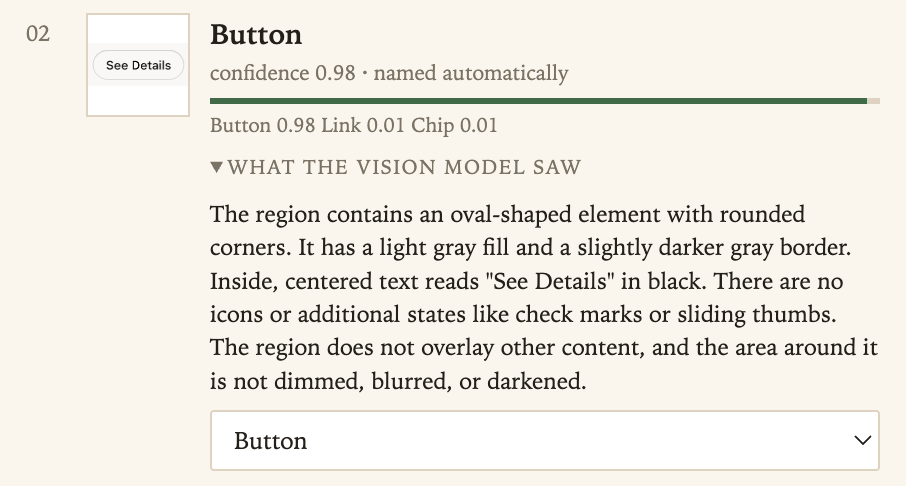
The vision description is meant to leave inferred functionality out. Jev receives the description once and answers two separate questions: which component it is, and what kind of behaviour it appears to have. The plugin then compares the answers. Jev also answers five yes/no questions, including whether the region appears above other content. If Jev says Button but also guesses navigation, the plugin holds the result for review.
A small function combines the answers. A result is accepted for naming at a confidence of 0.9 or higher if the other checks agree, needs review from 0.5 up to but not including 0.9, and is marked unidentified below 0.5. I started with TypeSafe’s confidence guidance. A high score alone isn’t enough: the plugin also holds answers when the behaviour disagrees with the chosen component or a required property, such as appearing above other content, is missing.
Here, confidence describes how concentrated the returned probabilities are. A confidence of 0.9 does not establish that this plugin gets nine out of ten such regions right.
Two screens
“Back to project” split between Button 0.69 and Link 0.31, and the behaviour question answered “navigation”. The guide separates the two by what happens when you activate them, which a screenshot can’t show, so the panel flags it as a “confusion pair”: the guide may be unclear, the description poor, or the model simply wrong. The “Billing” heading came back as Other, which is the right answer for this little guide.
This screen has a group of chips, but my small guide has no “chip group”, so the model called it Tabs. It looked plausible enough that I missed it in the panel. The human review wasn’t infallible either. Oh well. The “You’re out of credits” panel looked like a modal, but it doesn’t float over the page, which the guide requires, so the plugin wouldn’t name it.
The guesses are visible and easy to change, as intended. They also aren’t stable: on another screen, running the same eighteen regions twice, nine minutes apart, changed the answer on two of them. One run is a sample, not a verdict. Whether checking the guesses saves time over naming everything by hand still needs measuring.
Why use two models?
I could have asked Sonnet to look at each region and name it, which would simplify the setup. Modern LLMs support schema-constrained output, so valid JSON and a fixed list of names don’t require Jev.
I wanted to try its decisions and probabilities as inputs to ordinary code. For example, the plugin holds an answer when a second component retains at least 0.20 probability. I adjusted that rule after a handful of calls; both it and Jev’s confidence numbers need more testing. I’d need to evaluate a chat model’s generated confidence estimates before using them this way too.
The speed and cost were encouraging. This is what I recorded for the seventeen-region run on 23 September, with four regions processed at a time:
| GPT-4o describing | Jev classifying | |
|---|---|---|
| Median time per region | 5.6 seconds | 0.36 seconds |
| Cost for all seventeen | $0.0811 | $0.00192 |
The whole run took 29.3 seconds and cost about $0.083, calculated from API token counts and the plugin’s configured rates. Jev was about 2% of the bill; almost all the money went on looking at pictures. For a designer, that’s half a minute for a first sorting pass, before review, with little extra waiting or cost for classification.
Where I’d take it
Field Guide is an experiment with a small guide, a review panel and a local proxy to reach Jev from Figma. I’d find it more useful inside a larger mapping system that collects screens, tracks where regions came from, and lets designers compare and correct the groups.
If I were building a production version now, I’d probably start with the page’s code and structure. Element types, accessible names, links and nesting would give Jev text to work with directly, potentially avoiding the vision step for many regions. But a card may be a collection of ordinary div elements; the HTML alone may not make the visual grouping clear. I’d expect to combine page structure with visual analysis where it adds information.
The guide would describe the team’s actual components, and accepted results could become test examples. Unresolved groups would be worth inspecting too: are we missing a category, such as chip groups, or information about how something behaves?
This small experiment left me more excited about Jev than when I started. There is plenty left to test, but the speed, cost and way the answers fit into ordinary code make me want to try it in more of the tools I build.
And it seems to me that the future of automation is already here.
Repository: github.com/chillyweather/field-guide
Further reading: Introducing System One models and Jev · Jev documentation · Diogo Almeida’s talk